
Islamic coin (HAQQ) announced TestNet where anybody could try to contribute by installing Node, here is the full guide how to do it step by step. HAQQ is a top early stage blockchain project.
Islamic Coin is a halal digital asset, designed to create value for the Muslim community. It is built on the native Haqq blockchain, and stringently abides by Islamic Finance principles. Issued by the World’s leading authorities in Islamic Finance, Islamic Coin has been provided a Fatwa based on the Holy Teachings of the Quran. That means 2 billion Muslims can officially use this currency, and it does not contradict religious principles.
Scalable and fast EVM (Ethereum Virtual Machine) compliant blockchain, the ability to work with the Cosmos ecosystem, experienced financiers who managed billions of dollars are working on the project, HAQQ Blockchain Has Already Raised $200M in Private Seed Round.
Official links to Islamic Coin HAQQ TestNet: Website, Discord, GitHub, YouTube, Medium, Twitter, LinkedIn, Facebook, Telegram, Instagram
| Status | Active |
| Start date | September 8, 2022 |
| End date | TBA |
| Rewards | TBA |
| Participation requirements: | Fill-in the registration form Running a node Completing challenges |
| Token | $ISLM |
- HAQQ Validators Contest
- Islamic Coin HAAQ Node Install Guide
- Setup a server
- Choose terminal
- Installing and configuring the HAQQ TestNet Node
- Request Testnet tokens
- Create Validator
- Where to view transactions in HAQQ?
- Haqq Validators Contest / TestNet Relaunch
- How to prepare your node to Haqq Validators Contest
- Submit gentx
- If you do not transfer node to another server
- If you transfer the node to another server
- Quests for Validators Contest / HAQQ Intensivized TestNet
- Quest 1 – Submit gentx (200 XP)
- Quest 2 – Follow HAQQ Twitter (100 XP)
- More quests
- Useful commands
- Node commands
- Transactions commands
- Wallet Commands
- Update Node
- Delete Node
- Governance Commands
- Peers Commands
- Additional Commands
- Common Problems
- My validator has voting_power: 0
- My node crashes because of too many open files
- My node crashes because of validator set is nil in genesis and still empty after InitChain
- I have an error while running validator wrong Block.Header.AppHash.
- Useful Links
HAQQ Validators Contest
On September 8, 2022 HAQQ TestEdge will be relaunched, and the genesis block will bootstrap a Validator Contest – an opportunity for validators to get a delegation on MainNet! Delegation will be made for top 20 participants after MainNet transition to Proof of Stake, which is scheduled to happen after ISLM listing on exchanges.
How to get qualified:
- Introduce yourself in the form – https://haqq-network.typeform.com/to/zEgmX3TO
- Answer questions related to your experience in other networks.
- Create a
gentxwith your moniker and open a Pull Request in testnet’s repository – https://github.com/haqq-network/validators-contest, for review by the team. - Based on assessment of the forms as well as the correct submission of
gentx, the first 100 validators will be selected to launch the network, the remaining participants, divided into groups, will receive a delegation from the team to get into the active set. - Connect your account to the leaderboard (https://haqq-val-contest.crew3.xyz) of our testnet via Discord.
The deadline is September 6th, after which there will be a review and network launch on September 8th
Islamic Coin HAAQ Node Install Guide
Setup a server
According to HAQQ Documentation to run TestNet Node, you will need a machine with the following minimum hardware requirements:
| CPU | 4 or more physical CPU cores |
| RAM | At least 32GB of memory (RAM) |
| Storage | At least 500GB of SSD disk storage |
| Network | At least 100mbps network bandwidth |
| OS | Linux |
As the usage of the blockchain grows, the server requirements may increase as well, so you should have a plan for updating your server as well.
But in fact for now like all other Cosmos Nodes this setup will fit:
| CPU | 4 |
| RAM | 8GB |
| Storage | 100GB |
| Network | 100mbps network bandwidth |
| OS | Linux |
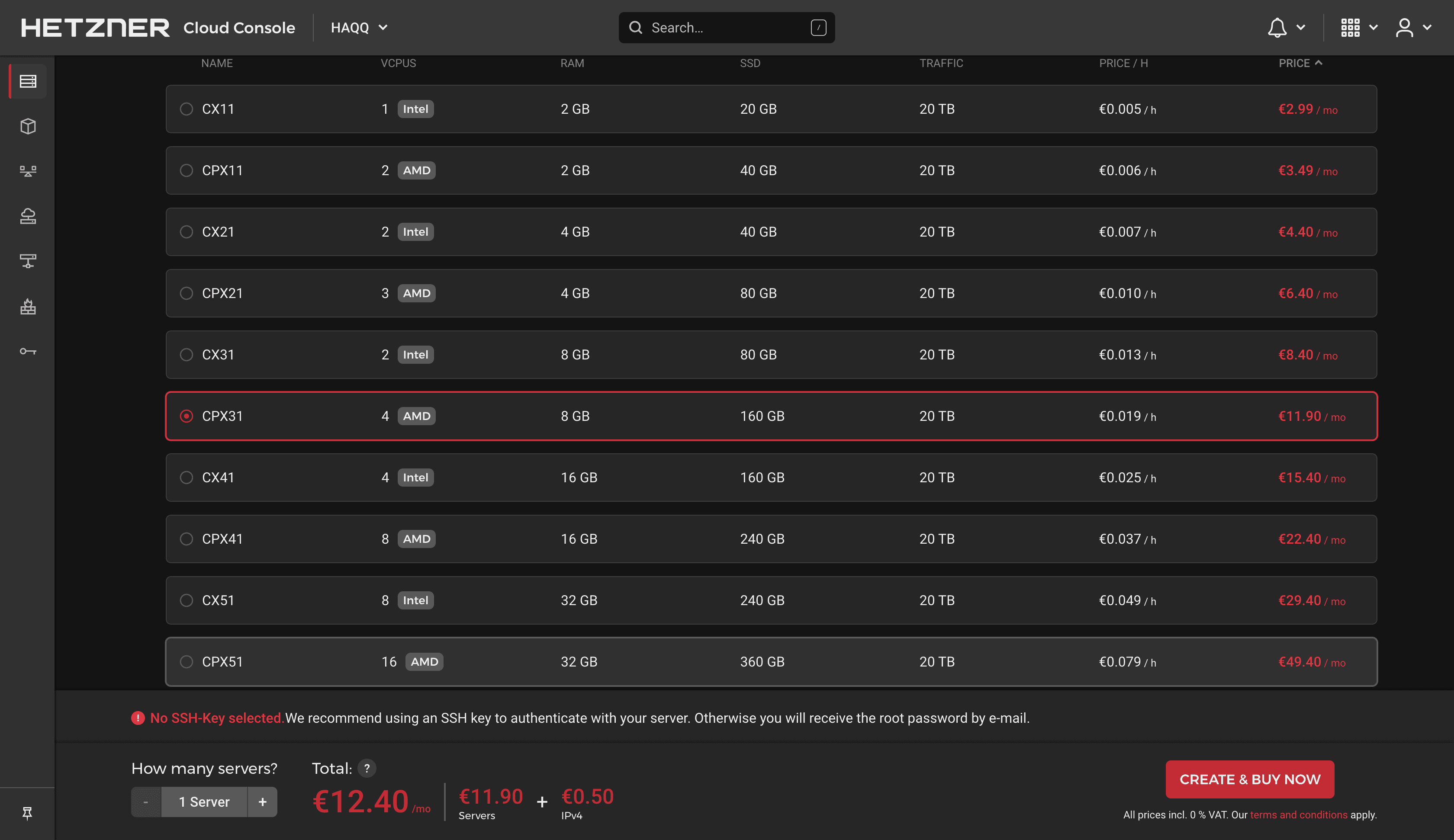
For me it will be Hetzner CPX31 (all default settings), price is low (0,019€/h, €12.40/mo) and power is enough for start but if you will be selected to HAQQ Incentivized Testnet you will need to use another one. I will update this guide when it starts.
Choose terminal
All actions described in this guide will be made in terminal (command line), so no any icons or desktop you are used to. Of course you can use your standard Windows or Mac terminal, but I personally prefer Termius. It’s more convenient and has a free version.
Installing and configuring the HAQQ TestNet Node
As always first updating packages
sudo apt update && sudo apt upgrade -yInstall additional packages
sudo apt install curl build-essential git wget jq make gcc tmux htop nvme-cli pkg-config libssl-dev libleveldb-dev tar clang bsdmainutils ncdu unzip libleveldb-dev -yInstall GO and check the version:
ver="1.18.2" && \
wget "https://golang.org/dl/go$ver.linux-amd64.tar.gz" && \
sudo rm -rf /usr/local/go && \
sudo tar -C /usr/local -xzf "go$ver.linux-amd64.tar.gz" && \
rm "go$ver.linux-amd64.tar.gz" && \
echo "export PATH=$PATH:/usr/local/go/bin:$HOME/go/bin" >> $HOME/.bash_profile && \
source $HOME/.bash_profile && \
go version
Download and install binaries from Github:
git clone https://github.com/haqq-network/haqq.git
cd haqq
make install
chmod +x /root/go/bin/haqqd && sudo mv /root/go/bin/haqqd /usr/local/bin/haqqd
cd $HOME
Set variables, replace <your_name> with your names
MONIKER="your_name"
CHAIN="haqq_53211-1"
WALLET_NAME="your_name"
Add everything to your bash profile
echo 'export MONIKER='${MONIKER} >> $HOME/.bash_profile
echo 'export CHAIN='${CHAIN} >> $HOME/.bash_profile
echo 'export WALLET_NAME='${WALLET_NAME} >> $HOME/.bash_profile
source $HOME/.bash_profile
Initialise the node
haqqd init $MONIKER --chain-id $CHAINPut the network name in Config
haqqd config chain-id $CHAINDownload the genesis file and check it
curl -OL https://storage.googleapis.com/haqq-testedge-snapshots/genesis.json
mv genesis.json $HOME/.haqqd/config/genesis.json
haqqd validate-genesis
Resetting the validator state
haqqd tendermint unsafe-reset-all --home $HOME/.haqqdSetting up synchronisation
curl -OL https://raw.githubusercontent.com/haqq-network/testnets/main/TestEdge/state_sync.sh
chmod +x state_sync.sh ./state_sync.sh
Setting up pruning
pruning="custom" && \
pruning_keep_recent="100" && \
pruning_keep_every="0" && \
pruning_interval="50" && \
sed -i -e "s/^pruning *=.*/pruning = \"$pruning\"/" $HOME/.haqqd/config/app.toml && \
sed -i -e "s/^pruning-keep-recent *=.*/pruning-keep-recent = \"$pruning_keep_recent\"/" $HOME/.haqqd/config/app.toml && \
sed -i -e "s/^pruning-keep-every *=.*/pruning-keep-every = \"$pruning_keep_every\"/" $HOME/.haqqd/config/app.toml && \
sed -i -e "s/^pruning-interval *=.*/pruning-interval = \"$pruning_interval\"/" $HOME/.haqqd/config/app.toml
Turning off the indexer
indexer="null" && \
sed -i -e "s/^indexer *=.*/indexer = \"$indexer\"/" $HOME/.haqqd/config/config.toml
Create a service file
sudo tee /etc/systemd/system/haqqd.service > /dev/null <<EOF
[Unit]
Description=haqqd
After=network-online.target

[Service]
User=$USER
ExecStart=$(which haqqd) start
Restart=on-failure
RestartSec=3
LimitNOFILE=65535

[Install]
WantedBy=multi-user.target
EOF
Start the service and wait for the node to sync
sudo systemctl daemon-reload && \
sudo systemctl enable haqqd && \
sudo systemctl restart haqqd
To speed up the synchronisation process
sudo systemctl stop haqqd
haqqd tendermint unsafe-reset-all --home $HOME/.haqqd
SEEDS="8f7b0add0523ec3648cb48bc12ac35357b1a73ae@195.201.123.87:26656,899eb370da6930cf0bfe01478c82548bb7c71460@34.90.233.163:26656,f2a78c20d5bb567dd05d525b76324a45b5b7aa28@34.90.227.10:26656,4705cf12fb56d7f9eb7144937c9f1b1d8c7b6a4a@34.91.195.139:26656"
PEERS=""; \
sed -i.bak -e "s/^seeds *=.*/seeds = \"$SEEDS\"/; s/^persistent_peers *=.*/persistent_peers = \"$PEERS\"/" $HOME/.haqqd/config/config.toml
wget -O $HOME/.haqqd/config/addrbook.json "https://raw.githubusercontent.com/StakeTake/guidecosmos/main/haqq/haqq_53211-1/addrbook.json"
SNAP_RPC="http://haqq.stake-take.com:36657"
LATEST_HEIGHT=$(curl -s $SNAP_RPC/block | jq -r .result.block.header.height); \
BLOCK_HEIGHT=$((LATEST_HEIGHT - 2000)); \
TRUST_HASH=$(curl -s "$SNAP_RPC/block?height=$BLOCK_HEIGHT" | jq -r .result.block_id.hash)
echo $LATEST_HEIGHT $BLOCK_HEIGHT $TRUST_HASH

sed -i.bak -E "s|^(enable[[:space:]]+=[[:space:]]+).*$|\1true| ; \
s|^(rpc_servers[[:space:]]+=[[:space:]]+).*$|\1\"$SNAP_RPC,$SNAP_RPC\"| ; \
s|^(trust_height[[:space:]]+=[[:space:]]+).*$|\1$BLOCK_HEIGHT| ; \
s|^(trust_hash[[:space:]]+=[[:space:]]+).*$|\1\"$TRUST_HASH\"| ; \
s|^(seeds[[:space:]]+=[[:space:]]+).*$|\1\"\"|" $HOME/.haqqd/config/config.toml
sudo systemctl restart haqqd && journalctl -u haqqd -f -o cat
Check the logs (to exit – press CTR + C)
sudo journalctl -u haqqd -f -o catWait for 20-30 min and check the synchronisation status. We need the catching_up section to be false
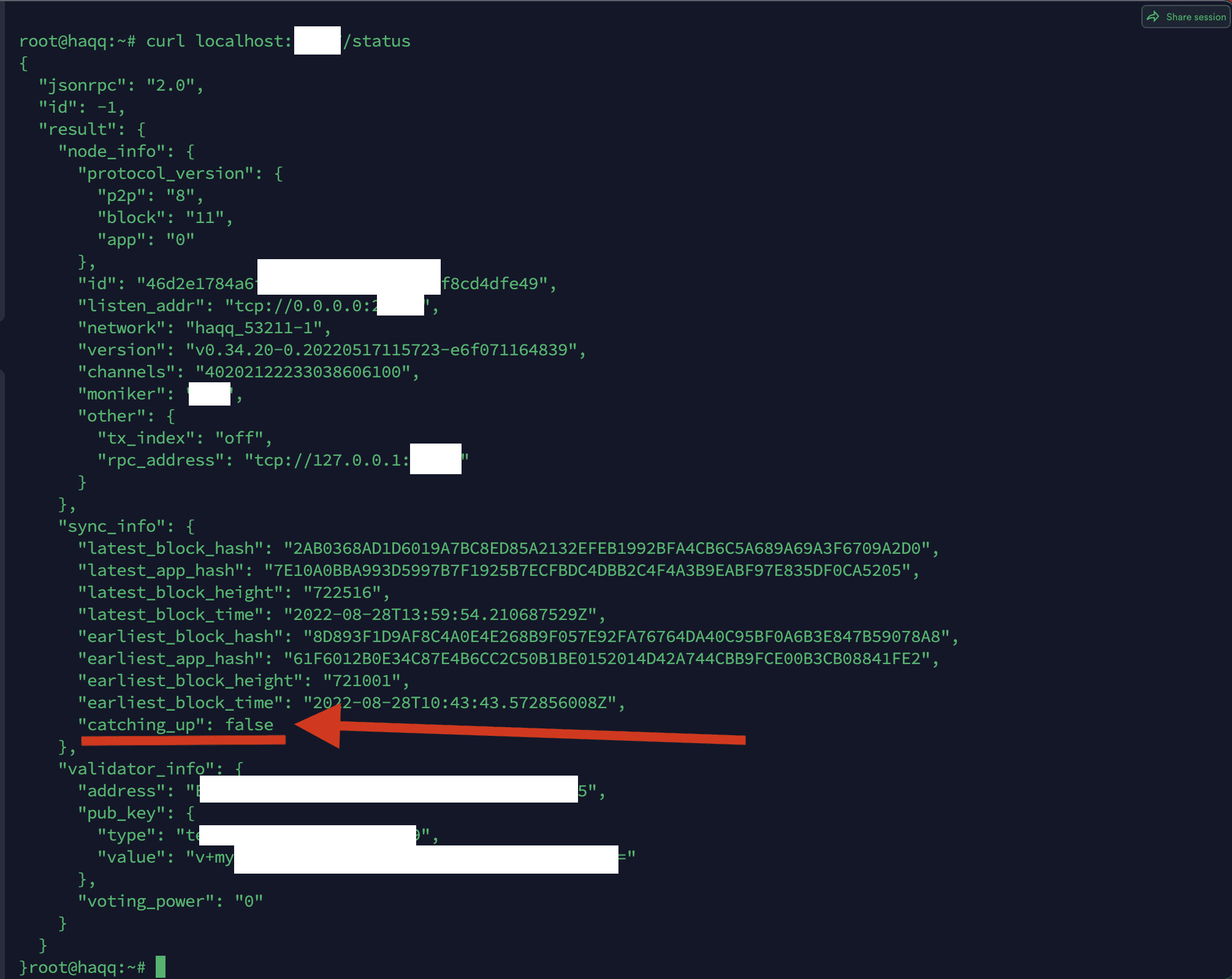
If you see
catching_upsection istrueyou need to updateaddress_book.json
Here is command to update address_book.json
sudo systemctl stop haqqd
rm $HOME/.haqqd/config/addrbook.json
wget -O $HOME/.haqqd/config/addrbook.json "https://raw.githubusercontent.com/StakeTake/guidecosmos/main/haqq/haqq_53211-1/addrbook.json"
sudo systemctl restart haqqd && journalctl -u haqqd -f -o cat
It worked for me, but I am not sure it work every time. Try to ask in HAQQ discord for updated address book
After node syncs, create a wallet and write down all the data in a safe place, especially the 24 words seed phrase
haqqd keys add $WALLET_NAME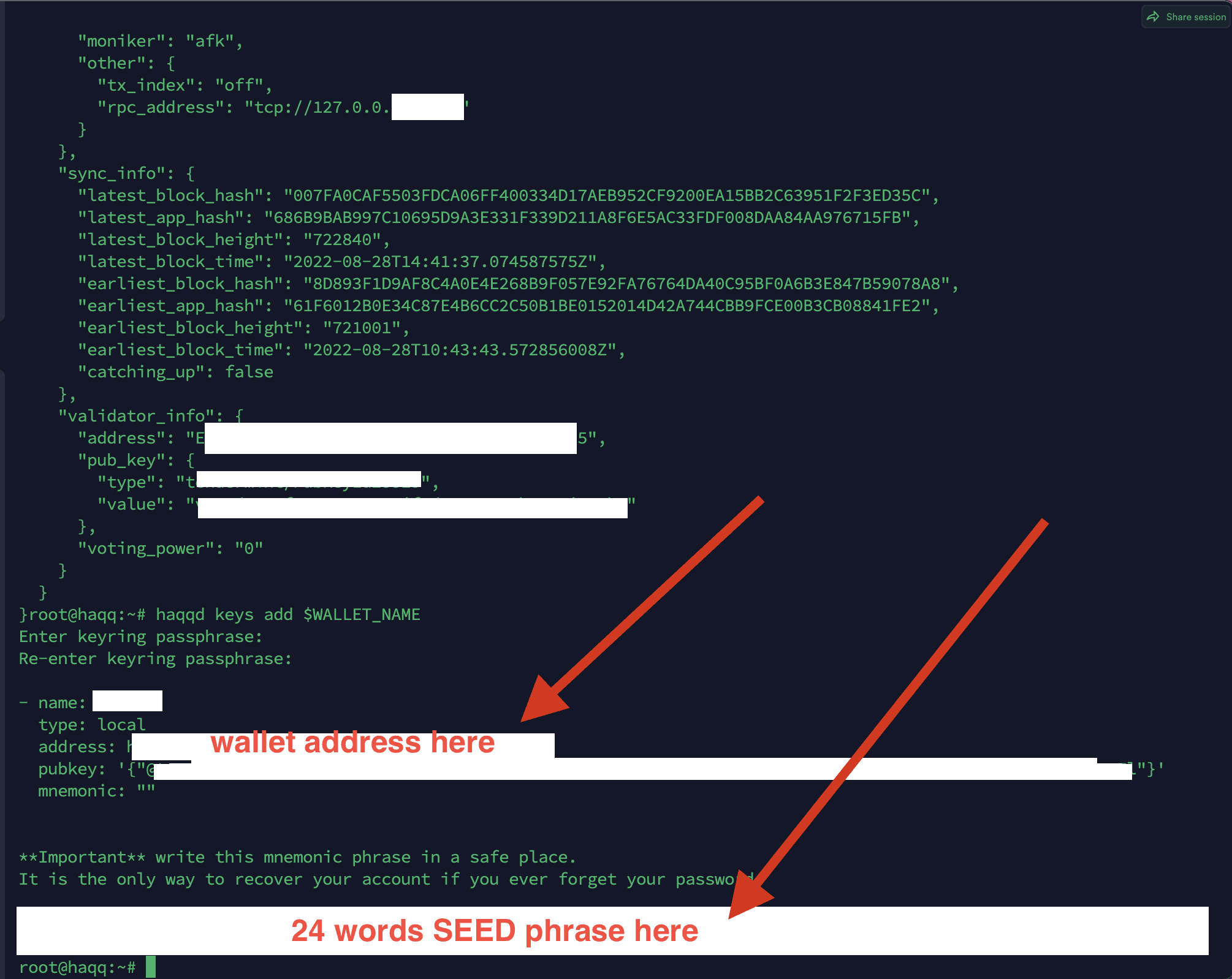
Add a variable with the wallet address
WALLET_ADDRESS=$(haqqd keys show $WALLET_NAME -a)Adding a variable to bash profile
echo 'export WALLET_ADDRESS='${WALLET_ADDRESS} >> $HOME/.bash_profile
source $HOME/.bash_profile
Request Testnet tokens
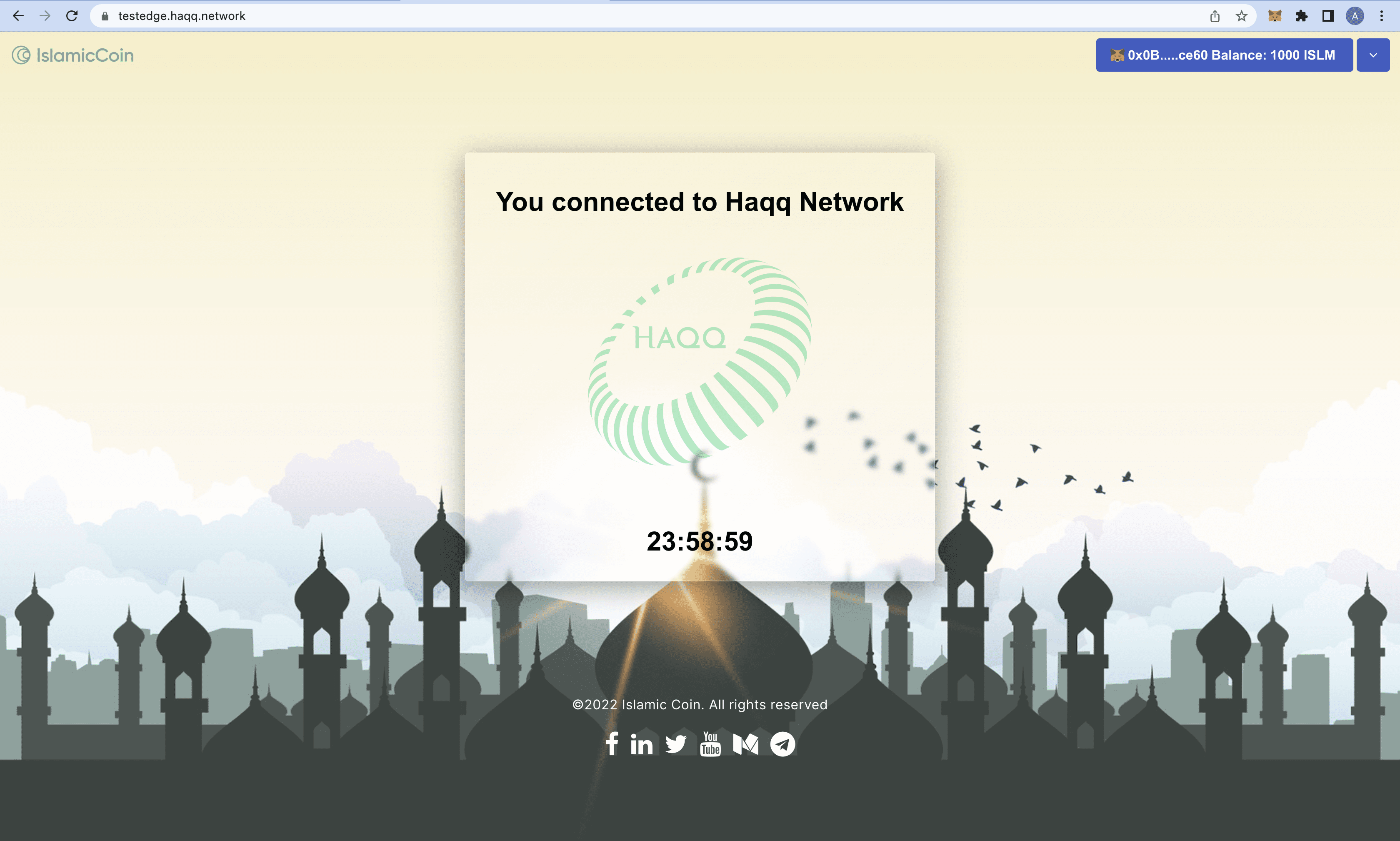
Request $ISLM test tokens here – https://testedge.haqq.network/. For this step you will need to install Metamask Chrome Extension and GitHub account.
Show private key. Use this private key to import your wallet in Metamask
haqqd keys export <name_wallet> --unarmored-hex --unsafeClick the Connect Wallet button

Than follow these steps:
- Import wallet using your private key
- Connect Metamask wallet to website
- Click on
Loginbutton to authorising via your GitHub account - Click on
Sign in with Githubbutton to approve authorisation - Click on
Request Tokensbutton to receive test $ISLM tokens
To prevent the faucet account from draining the available funds, the Haqq TestEdge faucet imposes a maximum number of requests for a period of time. By default, the faucet service accepts 1 request per day per address. You can request ISLM from the faucet for each address only once every 24h. If you try to request multiple times within the 24h cooldown phase, no transaction will be initiated. Please try again in 24 hours.
Create Validator
Get wallet data and write them down, you will it next steps. Replace <wallet_address> with your wallet address
haqqd debug addr <wallet_address>Checking the balance
haqqd query bank balances $WALLET_ADDRESSShould be 1000*(10^18) – that’s 1000 $ISLM test coins (amount could be different later).

After you get tokens, create a validator.
You can specify your own amount depending how much you got. In this command 100 $ISLM tokens.
haqqd tx staking create-validator \
  --amount=100000000000000000000aISLM \
  --pubkey=$(haqqd tendermint show-validator) \
  --moniker=$MONIKER \
  --chain-id=haqq_53211-1 \
  --commission-rate="0.10" \
  --commission-max-rate="0.20" \
  --commission-max-change-rate="0.01" \
  --min-self-delegation="1000000" \
  --gas="auto" \
  --from=$WALLET_NAME \
  --node https://rpc.tm.testedge.haqq.network:443
Set a variable with the validator address
VALOPER=$(haqqd keys show $WALLET_ADDRESS --bech val -a)Add it to your bash profile
echo 'export VALOPER='${VALOPER} >> $HOME/.bash_profile
source $HOME/.bash_profile
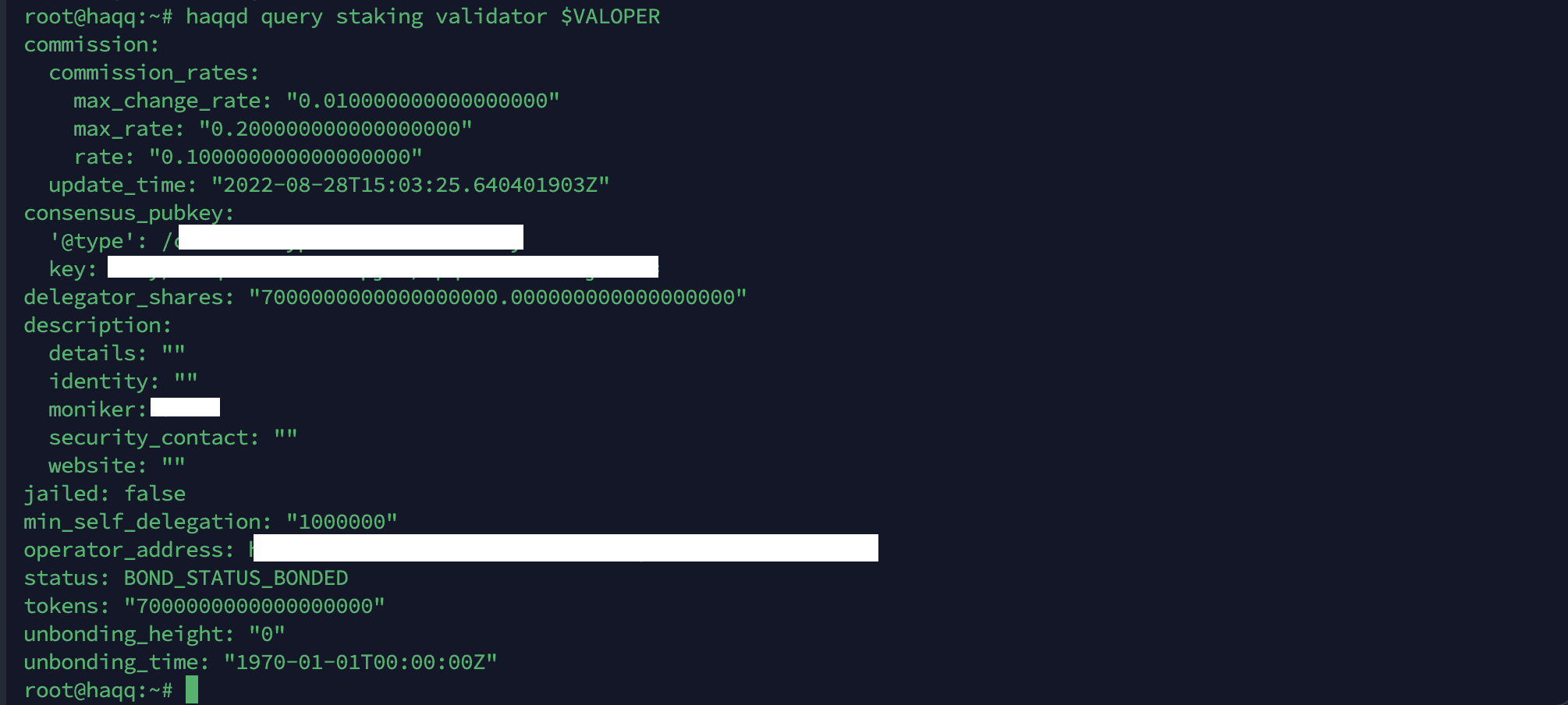
Validator Status Check
haqqd query staking validator $VALOPERShould look like this:
Delegate to yourself 1 token
haqqd tx staking delegate $VALOPER 1000000000000000000aISLM --from $WALLET_NAME --chain-id haqq_53211-1You can continue to delegate all tokens to yourself, but keep a few coins for commission
Everything is done. Now you have running node, validator and delegated stake. Check and find yourself in validators lists in explorers
Where to view transactions in HAQQ?
Today I know 3 main explorers to check validators, blocks, transactions etc:
Haqq Validators Contest / TestNet Relaunch
After first wave of TestNet HAQQ decided to relaunch TestNet with new validators. Using 100 Validators for genesis start and 5 waves of 100-150 validators next. So what to do if you already installed node?
Here is 5 waves of chosen validators (find yourself by discord name) –https://docs.google.com/spreadsheets/d/1jRBe64-WsnLNTHAOLUU5Ed_8CODU60Y4Enm59Bs_d60/edit#gid=0
How to prepare your node to Haqq Validators Contest
Submit gentx
- Visit HAQQ GitHub page https://github.com/haqq-network/validators-contest
- Click
Fork,Create a new fork
If have already installed node use these commands
haqqd init $MONIKER --chain-id haqq_54211-2 haqqd config chain-id haqq_54211-2haqqd gentx YOURWALLETNAME 10000000000000000000aISLM \
--chain-id=haqq_54211-2 \
--moniker="$MONIKER" \
--commission-max-change-rate 0.05 \
--commission-max-rate 0.20 \
--commission-rate 0.05 \
--website="" \
--security-contact="" \
--identity="" \
--details=""Copy file path that you will see
cat yourpath.jsonDownload this file to your computer, you will need it in next steps. Rename it with yourmoniker.json
scp -r root@your_server_ip:/root/.haqqd/config/gentx/gentx-xxx.json /your_local_machine_path/Go to your GitHub page, to repository you forked Add file, Upload files (and upload file you downloaded)
Than click Pull Request, New pull request, Create pull request
After that go to https://github.com/haqq-network/validators-contest/pulls, find your pull request and copy link to it.
And here https://haqq-val-contest.crew3.xyz/ connect your wallet and submit your gentx
If you do not transfer node to another server
Update binary haqqd to v1.0.3
cd $HOME/haqq && \
git fetch && \
git checkout v1.0.3 && \
make install && \
haqqd version --long | head
You will see this
name: haqq
server_name: haqqd
version: '"1.0.3"'
commit: 58215364d5be4c9ab2b17b2a80cf89f10f6de38a
Remove old genesis and download genesis.json to your server in .haqqd folder
rm -rf $HOME/.haqqd/config/genesis.json && cd $HOME/.haqqd/config/ && wget https://raw.githubusercontent.com/haqq-network/validators-contest/master/genesis.jsonCheck genesis.json
sha256sum $HOME/.haqqd/config/genesis.json
8c79dda3c8f0b2b9c0f5e770136fd6044ea1a062c9272d17665cb31464a371f7
Create a service file
sudo tee /etc/systemd/system/haqqd.service > /dev/null <<EOF
[Unit]
Description=Haqq Node
After=network.target

[Service]
User=$USER
Type=simple
ExecStart=$(which haqqd) start
Restart=on-failure
LimitNOFILE=65535

[Install]
WantedBy=multi-user.target
EOF
Insertion of peers
seeds="62bf004201a90ce00df6f69390378c3d90f6dd7e@seed2.testedge2.haqq.network:26656,23a1176c9911eac442d6d1bf15f92eeabb3981d5@seed1.testedge2.haqq.network:26656"
peers="b3ce1618585a9012c42e9a78bf4a5c1b4bad1123@65.21.170.3:33656,952b9d918037bc8f6d52756c111d0a30a456b3fe@213.239.217.52:29656,85301989752fe0ca934854aecc6379c1ccddf937@65.109.49.111:26556,d648d598c34e0e58ec759aa399fe4534021e8401@109.205.180.81:29956,f2c77f2169b753f93078de2b6b86bfa1ec4a6282@141.95.124.150:20116,eaa6d38517bbc32bdc487e894b6be9477fb9298f@78.107.234.44:45656,37513faac5f48bd043a1be122096c1ea1c973854@65.108.52.192:36656,d2764c55607aa9e8d4cee6e763d3d14e73b83168@66.94.119.47:26656,fc4311f0109d5aed5fcb8656fb6eab29c15d1cf6@65.109.53.53:26656,297bf784ea674e05d36af48e3a951de966f9aa40@65.109.34.133:36656,bc8c24e9d231faf55d4c6c8992a8b187cdd5c214@65.109.17.86:32656"
sed -i -e 's|^seeds *=.*|seeds = "'$seeds'"|; s|^persistent_peers *=.*|persistent_peers = "'$peers'"|' $HOME/.haqqd/config/config.toml
Run the service file and see the logs of your node
sudo systemctl daemon-reload && \
sudo systemctl enable haqqd && \
sudo systemctl restart haqqd && \
sudo journalctl -u haqqd -f -o cat
If you run a node at the beginning of the testnet and you are on genesis, you will get this message
Genesis time is in the future. Sleeping until then... genTime=...If you transfer the node to another server
If you want to move to another server – make sure you have saved the mnemonic and priv_validator_key.json from the server where you did the gentx
Update packages and install required packages
sudo apt update && sudo apt upgrade -y && \
sudo apt install curl tar wget clang pkg-config libssl-dev jq build-essential bsdmainutils git make ncdu gcc git jq chrony liblz4-tool -y
Install Go 1.18.3
wget https://golang.org/dl/go1.18.3.linux-amd64.tar.gz; \
rm -rv /usr/local/go; \
tar -C /usr/local -xzf go1.18.3.linux-amd64.tar.gz && \
rm -v go1.18.3.linux-amd64.tar.gz && \
echo "export PATH=$PATH:/usr/local/go/bin:$HOME/go/bin" >> ~/.bash_profile && \
source ~/.bash_profile && \
go version > /dev/null
Install binary project
cd $HOME && git clone https://github.com/haqq-network/haqq && \
cd haqq && \
git checkout v1.0.3 && \
make install && \
haqqd version --long | head
You will see this
name: haqq
server_name: haqqd
version: '"1.0.3"'
commit: 58215364d5be4c9ab2b17b2a80cf89f10f6de38a
Also init your node
haqqd init <YOURMONIKER> --chain-id haqq_54211-2 && \
haqqd config chain-id haqq_54211-2
Recover your wallet
haqqd keys add <YOURWALLET> --recoverUpload the saved priv_validator_key.json to your server. The path should look like this /.haqqd/config/priv_validator_key.json
Remove old genesis.json and download genesis.json to your server in .haqqd folder
rm -rf $HOME/.haqqd/config/genesis.json && cd $HOME/.haqqd/config/ && wget https://raw.githubusercontent.com/haqq-network/validators-contest/master/genesis.jsonCheck genesis.json
sha256sum $HOME/.haqqd/config/genesis.json
8c79dda3c8f0b2b9c0f5e770136fd6044ea1a062c9272d17665cb31464a371f7
Create a service file
sudo tee /etc/systemd/system/haqqd.service > /dev/null <<EOF
[Unit]
Description=Haqq Node
After=network.target

[Service]
User=$USER
Type=simple
ExecStart=$(which haqqd) start
Restart=on-failure
LimitNOFILE=65535

[Install]
WantedBy=multi-user.target
EOF
Insertion of peers
seeds="62bf004201a90ce00df6f69390378c3d90f6dd7e@seed2.testedge2.haqq.network:26656,23a1176c9911eac442d6d1bf15f92eeabb3981d5@seed1.testedge2.haqq.network:26656"
peers="b3ce1618585a9012c42e9a78bf4a5c1b4bad1123@65.21.170.3:33656,952b9d918037bc8f6d52756c111d0a30a456b3fe@213.239.217.52:29656,85301989752fe0ca934854aecc6379c1ccddf937@65.109.49.111:26556,d648d598c34e0e58ec759aa399fe4534021e8401@109.205.180.81:29956,f2c77f2169b753f93078de2b6b86bfa1ec4a6282@141.95.124.150:20116,eaa6d38517bbc32bdc487e894b6be9477fb9298f@78.107.234.44:45656,37513faac5f48bd043a1be122096c1ea1c973854@65.108.52.192:36656,d2764c55607aa9e8d4cee6e763d3d14e73b83168@66.94.119.47:26656,fc4311f0109d5aed5fcb8656fb6eab29c15d1cf6@65.109.53.53:26656,297bf784ea674e05d36af48e3a951de966f9aa40@65.109.34.133:36656,bc8c24e9d231faf55d4c6c8992a8b187cdd5c214@65.109.17.86:32656"
sed -i -e 's|^seeds *=.*|seeds = "'$seeds'"|; s|^persistent_peers *=.*|persistent_peers = "'$peers'"|' $HOME/.haqqd/config/config.toml
Run the service file and see the logs of your node
sudo systemctl daemon-reload && \
sudo systemctl enable haqqd && \
sudo systemctl restart haqqd && \
sudo journalctl -u haqqd -f -o cat
If you run a node at the beginning of the TestNet and you are on genesis, you will get this message
Genesis time is in the future. Sleeping until then... genTime=...Quests for Validators Contest / HAQQ Intensivized TestNet
Like any other TestNet HAQQ Validators Contest is based on points (XP), more quests you will do, more XP you get, more chances to get rewards. It could be validators tasks, social media posts, articles, etc.
- First you need to register and login using your discord to HAQQ CREW3 – https://haqq-val-contest.crew3.xyz/
- All quests are posted on Quest Board – https://haqq-val-contest.crew3.xyz/questboard
- Here is HAQQ Validators Leaderboard – https://haqq-val-contest.crew3.xyz/leaderboard
Quest 1 – Submit gentx (200 XP)
You already running a node, have a validator and first quest done (by submitting your gentx)
Quest 2 – Follow HAQQ Twitter (100 XP)
All you need to do is just follow HAQQ Twitter and submit it
More quests
I will update quests when they will be published
Useful commands
Node commands
Check blocks
haqqd status 2>&1 | jq ."SyncInfo"."latest_block_height"Check logs
journalctl -u haqqd -f -o cat
journalctl --lines=100 --follow --unit haqqd
Check status
curl localhost:26657/statusCheck balance. Replace <your_address>
haqqd q bank balances <your_address>Check validator pubkey
haqqd tendermint show-validatorCheck the validator
haqqd query staking validator <valoper_address>
haqqd query staking validators --limit 1000000 -o json | jq '.validators[] | select(.description.moniker=="<name_moniker>")' | jq
Check TX_HASH info
haqqd query tx <TX_HASH>Network parameters
haqqd q staking params
haqqd q slashing params
Check how many blocks are skipped by the validator and from which block the active set is
haqqd q slashing signing-info $(haqqd tendermint show-validator)find out the validator creation transaction. Replace <your_valoper_address>
haqqd query txs --events='create_validator.validator=<your_valoper_address>' -o=json | jq .txs[0].txhash -rView active set
haqqd q staking validators -o json --limit=1000 \
| jq '.validators[] | select(.status=="BOND_STATUS_BONDED")' \
| jq -r '.tokens + " - " + .description.moniker' \
| sort -gr | nl
View inactive set
haqqd q staking validators -o json --limit=1000 \
| jq '.validators[] | select(.status=="BOND_STATUS_UNBONDED")' \
| jq -r '.tokens + " - " + .description.moniker' \
| sort -gr | nl
Transactions commands
Collect rewards from all validators delegated to (no commission)
haqqd tx distribution withdraw-all-rewards --from <name_wallet> --fees 500aISLM -yCollect rewards from a separate validator or rewards + commission from your own validator
haqqd tx distribution withdraw-rewards <valoper_address> --from <name_wallet> --fees 500aISLM --commission -yDelegate more to your stake (1 token in this example)
haqqd tx staking delegate <valoper_address> 1000000aISLM --from <name_wallet> --fees 500aISLM -yRedelegation to another validator
haqqd tx staking redelegate <src-validator-addr> <dst-validator-addr> 1000000aISLM --from <name_wallet> --fees 500aISLM -yUnbond
haqqd tx staking unbond <addr_valoper> 1000000aISLM --from <name_wallet> --fees 500aISLM -ySend tokens to another address
haqqd tx bank send <name_wallet> <address> 1000000aISLM --fees 500aISLM -yGet out of jail
haqqd tx slashing unjail --from <name_wallet> --fees 500aISLM -yIf transactions are not sent with an error
account sequence mismatch, expected 18, got 17: incorrect account sequence, then add the -s 1 switch to the command (replace “1” with the one waiting for sequence)
Wallet Commands
Display wallets list
haqqd keys listShow account key
haqqd keys show <name_wallet> --bech accShow validator key
haqqd keys show <name_wallet> --bech valShow consensus key
haqqd keys show <name_wallet> --bech consShow all supported addresses
haqqd debug addr <wallet_addr>Show private key
haqqd keys export <name_wallet> --unarmored-hex --unsafeRequest account
haqqd q auth account $(haqqd keys show <name_wallet> -a) -o textDelete wallet
haqqd keys delete <name_wallet>Update Node
sudo systemctl stop haqqd && cd stride
git pull
git checkout v0.5.2
make install
haqqd version
#
sudo systemctl restart haqqd && journalctl -u haqqd -f -o cat
Delete Node
sudo systemctl stop haqqd && \
sudo systemctl disable haqqd && \
rm /etc/systemd/system/haqqd.service && \
sudo systemctl daemon-reload && \
cd $HOME && \
rm -rf .haqqd haqq && \
rm -rf $(which haqqd)
Governance Commands
Proposals list
haqqd q gov proposalsVoting results
haqqd q gov proposals --voter <ADDRESS>Vote for proposal
haqqd tx gov vote 1 yes --from <name_wallet> --fees 555aISLMMake a deposit to proposal
haqqd tx gov deposit 1 1000000aISLM --from <name_wallet> --fees 555aISLMCreate proposal
haqqd tx gov submit-proposal --title="Randomly reward" --description="Reward 10 testnet participants who completed more than 3 tasks" --type="Text" --deposit="11000000grain" --from=<name_wallet> --fees 500grainPeers Commands
Check the number of peers
curl -s http://localhost:26657/net_info | jq -r '.result.peers[] | "\(.node_info.id)@\(.remote_ip):\(.node_info.listen_addr | split(":")[2])"' | wc -lList of connected peers monikers
curl -s http://localhost:26657/net_info | jq '.result.peers[].node_info.moniker'Check vote power online. Useful for upgrades
curl -s localhost:26657/consensus_state | jq '.result.round_state.height_vote_set[0].prevotes_bit_array'Check pre-vote of your validator
curl -s localhost:26657/consensus_state -s | grep $(curl -s localhost:26657/status | jq -r .result.validator_info.address[:12])Additional Commands
Search for all outgoing transactions by address
haqqd q txs --events transfer.sender=<ADDRESS> 2>&1 | jq | grep txhashSearch for all incoming transactions by address
haqqd q txs --events transfer.recipient=<ADDRESS> 2>&1 | jq | grep txhashFind out the RPC port
echo $(grep -A 3 "\[rpc\]" ~/.haqqd/config/config.toml | egrep -o ":[0-9]+")Common Problems
My validator has voting_power: 0
Your validator has become jailed. Validators get jailed, i.e. get removed from the active validator set, if they do not vote on 500 of the last 10000 blocks, or if they double sign.
If you got jailed for downtime, you can get your voting power back to your validator. First, if haqqd is not running, start it up again:
haqqd startWait for your full node to catch up to the latest block. Then, you can unjail your validator
haqqd tx slashing unjail --from <name_wallet> --fees 500aISLM -yLastly, check your validator again to see if your voting power is back.
haqqd statusYou may notice that your voting power is less than it used to be. That’s because you got slashed for downtime!
My node crashes because of too many open files
The default number of files Linux can open (per-process) is 1024. haqqd is known to open more than 1024 files. This causes the process to crash. A quick fix is to run ulimit -n 4096 (increase the number of open files allowed) and then restart the process with haqqd start. If you are using systemd or another process manager to launch haqqd this may require some configuration at that level. A sample systemdfile to fix this issue is below:
# /etc/systemd/system/haqqd.service
[Unit]
Description=Haqq Node
After=network.target

[Service]
Type=simple
User=ubuntu
WorkingDirectory=/home/ubuntu
ExecStart=/home/ubuntu/go/bin/haqqd start
Restart=on-failure
RestartSec=3
LimitNOFILE=4096

[Install]
WantedBy=multi-user.target
My node crashes because of validator set is nil in genesis and still empty after InitChain
Make sure you have a genesis file in $HOME/.haqqd/config/genesis.json if you don’t have this file you can find it here
curl -OL https://storage.googleapis.com/haqq-testedge-snapshots/genesis.jsonAnd also you can validate genesis file using this command
haqqd validate-genesisI have an error while running validator wrong Block.Header.AppHash.
First of all, you should make sure that your bin file is up to date
haqqd -v
# haqqd version "1.0.3" 58215364d5be4c9ab2b17b2a80cf89f10f6de38a
Current version is 1.0.3 on TestEdge.
This error can also occur if you run the validator from a period when blocks were produced on a different version of the binary. From this point, recommends starting the node using snapshot or statesync.
Useful Links
Haqq Documentation – https://docs.haqq.network/
Cosmos SDK Documentation – https://docs.cosmos.network/
Ethereum Documentation – https://ethereum.org/en/
Tendermint Core Documentation – https://docs.tendermint.com/
Thank you for reading, hope it helped. Drop a comment if you have any questions.
Subscribe to our Telegram and join Discord for latest updates and be a part of community!
In case you want to support my work and cover some servers cost:


