
Sui is a decentralised, high throughput, low latency smart contract platform using the Move language, the first permissionless Layer 1 blockchain designed from the ground up to enable creators and developers to build experiences that cater to the next billion users in web3, a boundless platform to build rich and dynamic on-chain assets from gaming to finance.
Official links to SUI Project: Website, Twitter, Medium, Github, Discord, Whitepaper
| Status | Active |
| Start date | Devnet: May 2022 Testnet: August 2022 |
| End date | Devnet: September 2022 Testnet: September 2022 |
| Rewards | $2,000 SUI per milestone if minimum requirements are met; Up to 1,000,000,000 $SUI (up to 10% of the total supply) as delegations to the top performing validators. |
| Participation requirements: | 18+ years old (KYC on Coinlist); Running node in Devnet; Fill this form by August 15 (use email address from Coinlist) |
- Server Requirements for SUI DevNet and TestNet Node
- SUI Testnet Roadmap
- How to Setup SUI TestNet Node Full Install Guide
- Rent a server
- Choose terminal
- Launch
- Creating a wallet
- Check in yourself
- Publishing RPC node
- Request tokens from a faucet
- Create an NFT
- Final
- If need to update or something goes wrong
- Node update
- Restoring a node
- Deleting a node
- Useful Commands
- FAQ
Server Requirements for SUI DevNet and TestNet Node
| Devnet | 2 CPU, 8 GB RAM, 50 GB SSD, Ubuntu 20.04 |
| Testnet | m5.2xlarge (8vCPU, 32GB RAM) + 128GB SSD |
Rent servers on: Hetzner | Vultr | Linode | Contabo or similar services.
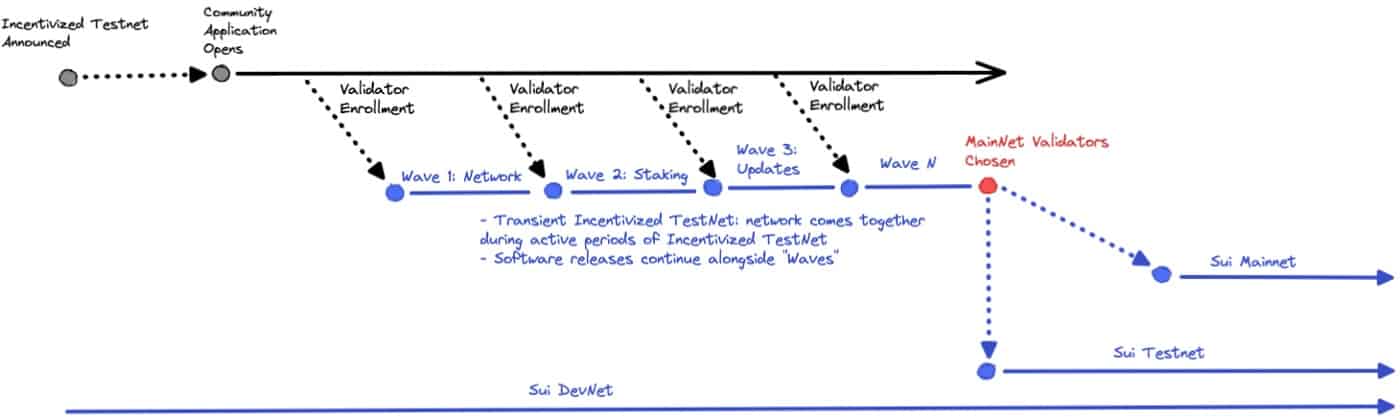
SUI Testnet Roadmap
Here is the simple picture visualising stages from DevNet to MainNet:
How to Setup SUI TestNet Node Full Install Guide
Rent a server
Best choice for start will be Hetzner CPX21 (all default settings), it’s cheap (0,01€/h, €6.40/mo) and enough for start but if you will be selected to Sui Incentivized Testnet you will need to use another one. I will update this guide when it starts.

Choose terminal
All actions described in this guide will be made in terminal (command line), so no any icons or desktop you are used to. Of course you can use your standard Windows or Mac terminal, but I personally prefer Termius. It’s more convenient and has a free version.
Launch
All actions must be performed under the root username.
Update packages and system
sudo apt update && sudo apt upgrade -yInstall required packages
sudo apt install wget jq git libclang-dev cmake -yInstall Rust
. <(wget -qO- https://raw.githubusercontent.com/SecorD0/utils/main/installers/rust.sh)Rust version must be at least 1.62.0
rustc --versionIf not, then uninstall with the command below and install again
. <(wget -qO- https://raw.githubusercontent.com/SecorD0/utils/main/installers/rust.sh) \
-un
Create node folder
mkdir -p $HOME/.suiMake a fork of the repository (the repository itself). Off course you can use original repository, but always better to have it in your GitHub account just in case.
Clone your repository with a node (you need to put your github username in the link)
git clone https://github.com/YOUR_USERNAME/suiOR if you use original copy this:
git clone https://github.com/MystenLabs/suiGo to the project folder
cd suiCreate a branch with the original repository
git remote add upstream https://github.com/MystenLabs/suiPull up the current version
git fetch upstreamSwitch to devnet version
git checkout --track upstream/devnetBuild binary files (speed depends on processor cores, may take 20-30 min)
cargo build --releaseMove binaries to binaries folder
mv $HOME/sui/target/release/{sui,sui-node,sui-faucet} /usr/bin/Return to home directory
cdDownload Genesis File
wget -qO $HOME/.sui/genesis.blob https://github.com/MystenLabs/sui-genesis/raw/main/devnet/genesis.blobCopy config
cp $HOME/sui/crates/sui-config/data/fullnode-template.yaml \
$HOME/.sui/fullnode.yaml
Edit config
sed -i -e "s%db-path:.*%db-path: \"$HOME/.sui/db\"%; "\
"s%metrics-address:.*%metrics-address: \"0.0.0.0:9184\"%; "\
"s%json-rpc-address:.*%json-rpc-address: \"0.0.0.0:9000\"%; "\
"s%genesis-file-location:.*%genesis-file-location: \"$HOME/.sui/genesis.blob\"%; " $HOME/.sui/fullnode.yaml
Open using ports
. <(wget -qO- https://raw.githubusercontent.com/SecorD0/utils/main/miscellaneous/ports_opening.sh) \
9000 9184
Create service file
printf "[Unit]
Description=Sui node
After=network-online.target

[Service]
User=$USER
ExecStart=`which sui-node` --config-path $HOME/.sui/fullnode.yaml
Restart=on-failure
RestartSec=3
LimitNOFILE=65535

[Install]
WantedBy=multi-user.target" > /etc/systemd/system/suid.service
Start service
sudo systemctl daemon-reload
sudo systemctl enable suid
sudo systemctl restart suid
Create alias to see node log (last 100 events)
. <(wget -qO- https://raw.githubusercontent.com/SecorD0/utils/main/miscellaneous/insert_variable.sh) -n sui_log -v "sudo journalctl -fn 100 -u suid" -aCheck if command outputs transactions
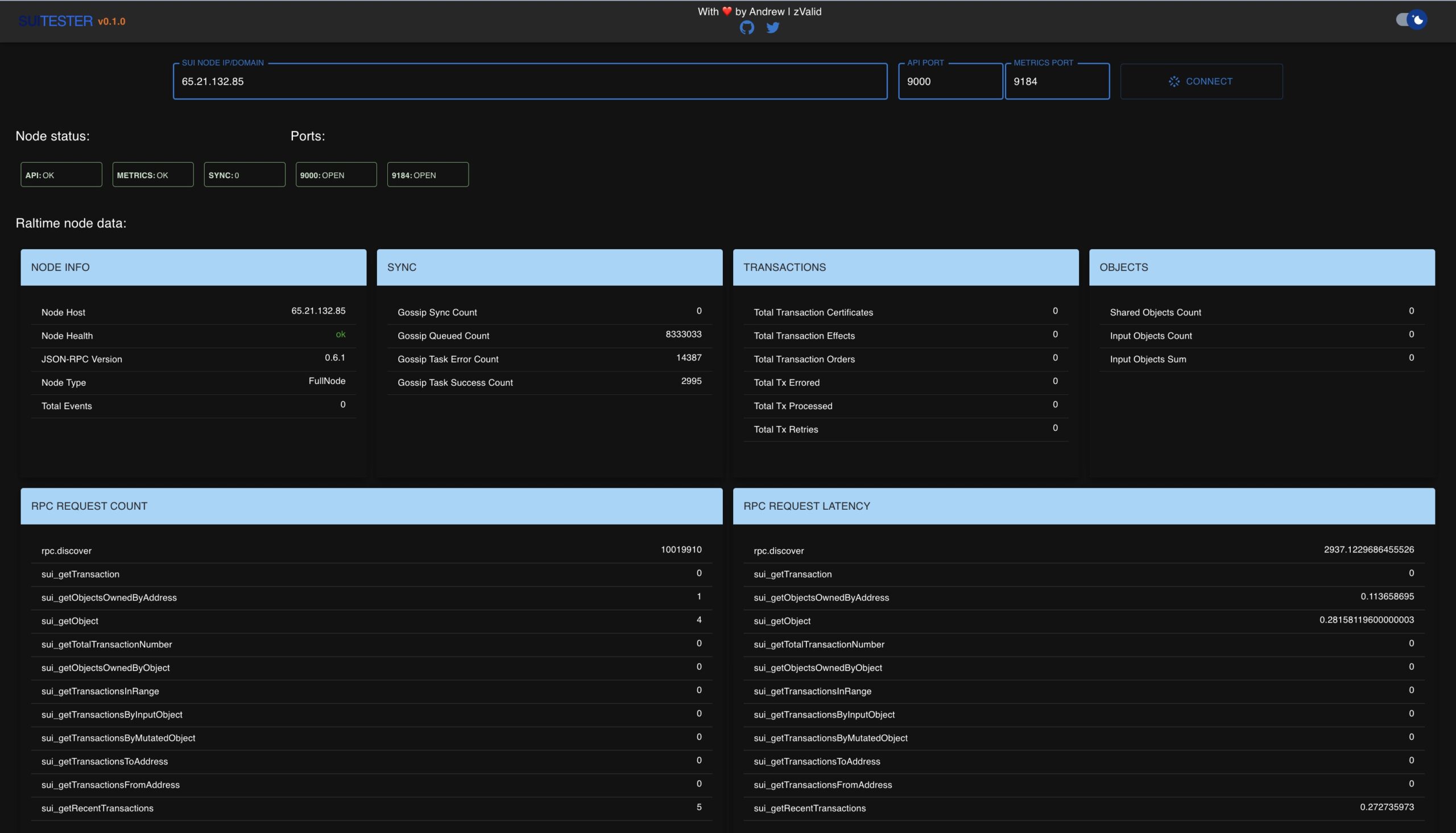
wget -qO- -t 1 -T 5 --header 'Content-Type: application/json' --post-data '{ "jsonrpc":"2.0", "id":1, "method":"sui_getRecentTransactions", "params":[5] }' "http://127.0.0.1:9000/" | jqIn addition, you can find yourself in the checker by entering the server IP. Just enter IP of your server, should look like this:
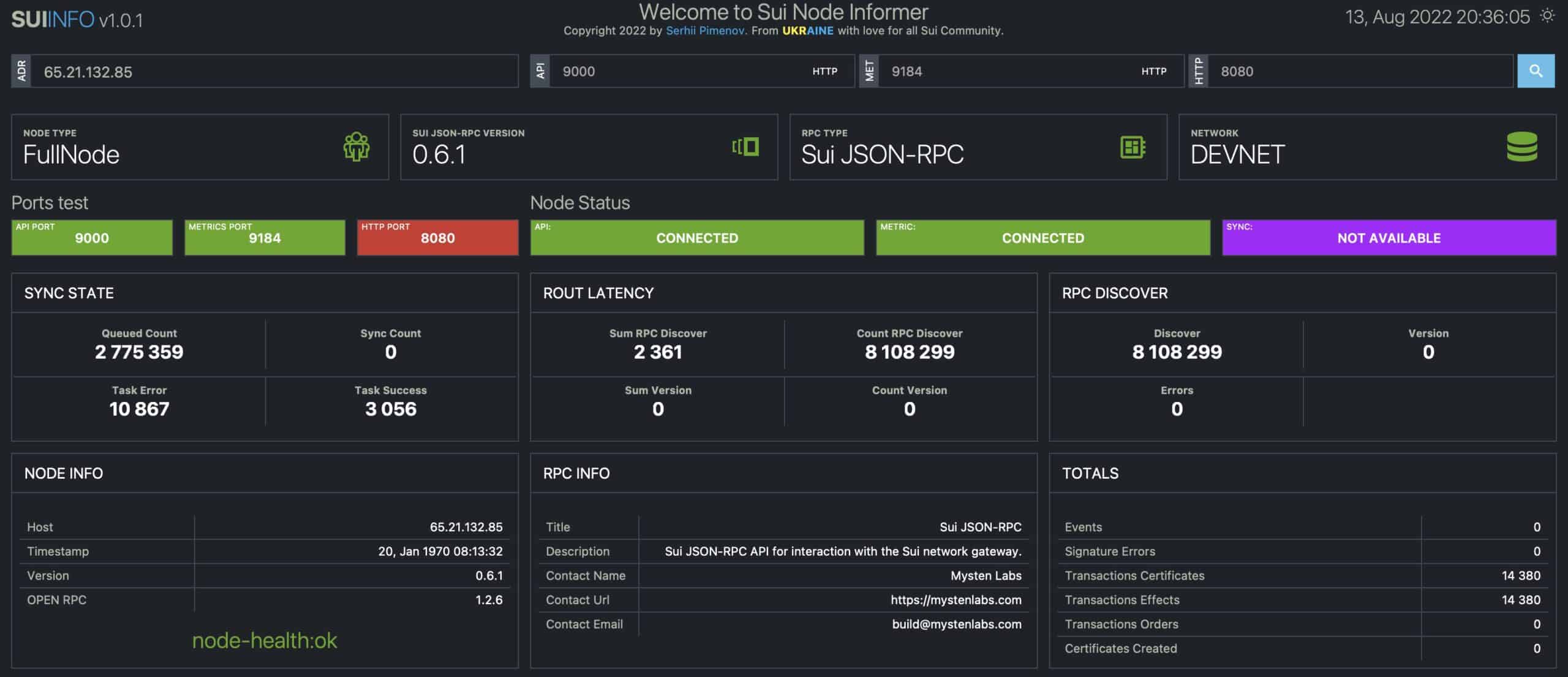
Or use second checker.
Creating a wallet
The wallet is created once (when updating the network you need to restore the previously created one)
To interact with the blockchain, you need to create a wallet, for this you need to run the command below, answer “y” to the first question, press Enter on the second
sui clientMake a backup copy of the folder with keys, saving it in a safe place (the command is copy folder to your local machine)
scp -r root@your_server_ip:/root/.sui/sui_config/ /your_local_machine_path/Check in yourself
As a confirmation of participation in DevNet, you can follow the steps below
Publishing RPC node
On the server, run the command below to get the RPC nodes
echo "http://`wget -qO- eth0.me`:9000/"Open the link in the browser on your PC, an inscription should appear (if it does not appear, then the node is not working)
Used HTTP Method is not allowed. POST or OPTIONS is requiredTo send your RPC, you need to join SUI Discord Server and send it to this channel. At the same time, it is better to keep node until Incentivized TestNet start.
Request tokens from a faucet
Output and copy the wallet address (in the left column)
sui keytool listGo to the channel #🚰・devnet-faucet, and send a command with YOUR wallet address
!faucet 0x___Create an NFT
An NFT sample is created by the command
sui client create-example-nftFinal
The folder with the keys must be saved in a safe place so that the wallet can be restored (the command displays the path)
You can monitor your node in the checker by entering the server IP.
The following activities have been carried out:
- Published RPC nodes;
- Requested tokens from a faucet;
- Created test NFT.
You can follow the project updates in the #📢・announcements channel.
Devnet updates are posted in the #📢・devnet-updates channel.
If need to update or something goes wrong
Node update
Stop node
systemctl stop suidDelete old database
rm -rf $HOME/.sui/dbDownload new genesis file
wget -qO $HOME/.sui/genesis.blob https://github.com/MystenLabs/sui-genesis/raw/main/devnet/genesis.blobGo to the project folder
cd $HOME/suiCreate a branch with the original repository, if not already created
git remote add upstream https://github.com/MystenLabs/sui
Pull up the current version
git fetch upstreamHide local changes
git stashUpdate local repository
git checkout -B devnet --track upstream/devnetBuild binary files (speed depends on processor cores, may take 20-30 min)
cargo build --releaseMove binaries to binaries folder
mv $HOME/sui/target/release/{sui,sui-node,sui-faucet} /usr/bin/Check version, should be 0.9.0
sui -VRestart node
systemctl restart suidUpdates since 0.7.0 change wallet address. All you need to do is replace active wallet.
Check active wallet
sui client active-addressCheck new address
sui keytool listIf they are different replace old wallet address with new
active=`grep -oPm1 "(?<=active_address: \")([^%]+)(?=\"$)" $HOME/.sui/sui_config/client.yaml | sed "s%0x%%"`; \
new=`sui keytool list | awk 'NR==3 {print $1}' | tr -d '[:space:]' | sed "s%0x%%"`; \
sed -i -e "s%$active%$new%; " $HOME/.sui/sui_config/client.yaml
How to check if it worked: Request tokens to new address in faucet and create test NFT
Restoring a node
Create node folder
mkdir -p $HOME/.suiMove the directory with keys from the backup to the server to the created folder
scp -r /your_local_machine_path/ root@your_server_ip:/root/.sui/sui_config/Run a node (from the beginning of this guide)
Deleting a node
Delete variable
. <(wget -qO- https://raw.githubusercontent.com/SecorD0/utils/main/miscellaneous/insert_variable.sh) -n sui_log -daStop node
systemctl stop suidRemove service file from autostart
systemctl disable suidDelete node files
rm -rf $HOME/{sui,.sui} /usr/bin/{sui,sui-node,sui-faucet} \
/etc/systemd/system/suid.service
Update service files list
systemctl daemon-reloadUseful Commands
View node log
sui_log
sudo journalctl -fn 100 -u suid
docker logs sui_node -fn100
View Node Wallets
sui keytool listView Main Wallet Objects
sui client objectsRestart node
systemctl restart suidDelete database and restart node
systemctl stop suid; \
rm -rf $HOME/.sui/db; \
systemctl restart suid
FAQ
Thank you for reading, hope it helped. Drop a comment if you have any questions.
Subscribe to our Telegram and join Discord for latest updates and be a part of community!
In case you want to support my work and cover some servers cost:


